The Hidden Value Audit: A 60-Minute Framework to Turn Security Data Into Business Outcomes

It's 6:45 PM on a Tuesday. Your ops manager is on the phone with a property manager who wants to know why three contractor vehicles were on-site at 9 PM last Thursday. Nobody dispatched them. Nobody logged them in. The access system recorded the entries, but no one looked until a tenant complained. Your ops manager spends 40 minutes pulling badge logs, cross-referencing the schedule, and calling your install team lead. Legitimate job that ran long. No issue. But the property manager doesn't care. They care that nobody told them. That callback cost your team an hour and your credibility a dent.
The callback had nothing to do with access control. The data existed. Nobody had a process to turn it into a decision before the phone rang.
Here's what keeps showing up in industry surveys: the systems you install are already generating data that goes way beyond security. Occupancy patterns. Compliance gaps. Contractor scheduling problems. The data is flowing. Most organizations just never look at it.
Every camera, reader, and panel on your network is generating decision leverage that nobody is using.
The Framework: Four Buckets of Hidden Value
The Hidden Value Audit sorts security data into four buckets, each tied to a business outcome your customer cares about.
Time: How many truck rolls, callbacks, and rework hours could the data eliminate if someone actually looked at it?
Compliance: Are exceptions, missed inspections, or undocumented access events piling up unnoticed?
Labor/Contractors: Is contractor activity going untracked or generating disputes with your customer?
Visibility/Decisions: What calls are your dispatchers and site managers making blind that they didn't need to?
Run the Audit in 60 Minutes
Step 1: Pick One Account (10 min) Purpose: Start small so you actually finish.
Choose a site with recurring service calls or a demanding property manager.
Pull the last 90 days of service tickets, alarm reports, and access logs.
Don't pick your biggest account. Pick your most annoying one.
Example: A retail site generating 6+ callbacks per quarter on the same door alarm.
Step 2: List Every Repeated Question (10 min) Purpose: Find where information gaps create rework.
Write down every question the customer asked in the last 90 days.
Group by category: access, alarms, scheduling, system status.
Example: "Who was on-site after 7 PM Friday?" asked three times in two months.
Step 3: Score Each Bucket (10 min) Purpose: Get an honest baseline.
Use the rubric in Toolkit Box 1.
Score the account across all four buckets. Most land between 2 and 4 out of 8.
Step 4: Identify 2 to 3 Outputs (10 min) Purpose: Match data to decisions.
Review the Insight Output Catalog in Toolkit Box 2.
Pick outputs that directly answer repeated questions from Step 2.
No output ships unless it changes a decision.
Example: A monthly contractor overstay report that triggers a review of after-hours access rules.
Step 5: Assign Ownership (10 min) Purpose: Reports without owners become PDFs nobody reads.
Name one person to generate each output and one to review it with the customer.
Set a cadence: weekly, monthly, or per-incident.
Step 6: Close the Loop (10 min) Purpose: Turn the output into a conversation.
Schedule a 15-minute review with the site contact.
Walk through what the data showed, what changed, what to watch next month.
Example: After sharing a recurring alarm heatmap, one property manager adjusted tenant access schedules. After-hours exceptions dropped from 14 to 5 per month.
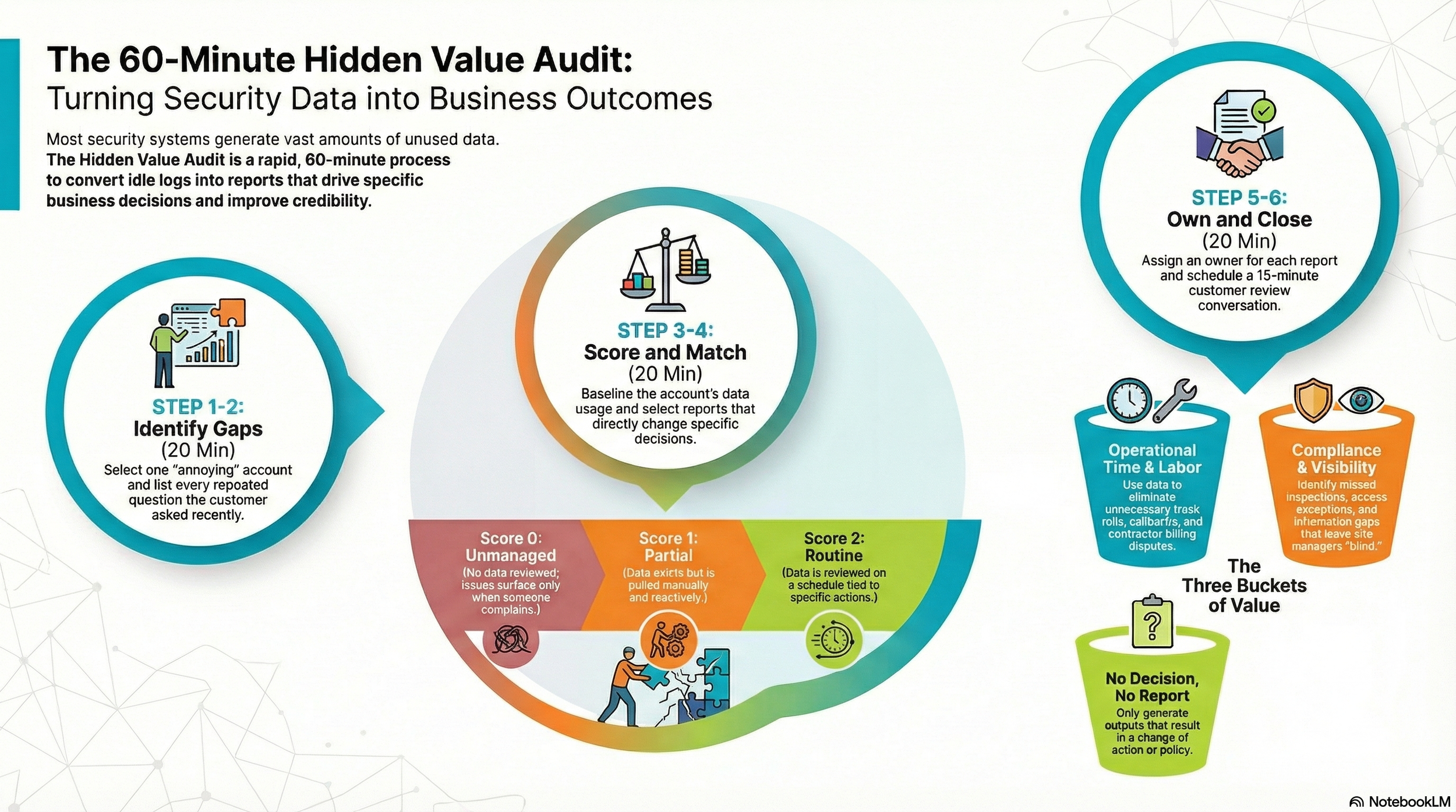
Toolkit Box 1: Bucket Scoring Rubric
Score each bucket 0 to 2.
0 (Unmanaged): No data reviewed. Issues surface only when someone complains.
1 (Partial): Data exists but pulled manually and reactively.
2 (Routine): Data reviewed on a schedule, tied to a specific action.
Total score (out of 8):
0 to 3: You're leaving money in the system. Start with one bucket.
4 to 5: Foundation is there. Move from reactive to routine.
6 to 8: Ahead of most. Look for patterns across accounts.
Toolkit Box 2: Insight Output Catalog
Ten monthly outputs, each tied to the decision it supports.
Contractor overstay report → Tighten after-hours access rules
Recurring alarm heatmap → Adjust dispatch workflows or sensor placement
After-hours access exceptions log → Review credential policies
Door held-open frequency report → Identify training or hardware issues
Service ticket repeat analysis → Prioritize preventive maintenance
Offline device summary → Reduce truck rolls for "no comms" calls
Occupancy trend snapshot → Support staffing decisions
Badge usage by time block → Validate contractor schedules (a site with 25 contractors/week spots drift fast)
Response time tracking → Benchmark dispatch and handoff speed
Monthly site risk summary → Drive quarterly business reviews
30/60/90 Day Rollout
Days 1 to 30: Run the audit on 3 accounts. Deliver 1 to 2 outputs each. Get feedback. Expect some to miss.
Days 31 to 60: Standardize what worked. Build templates. Train one person to run the audit without you.
Days 61 to 90: Expand to 10 accounts. Set a monthly review cadence. Track which outputs change decisions and which are noise. Kill the noise.
Five Failure Modes to Watch
Reporting without decisions. If an output doesn't change how someone acts, kill it.
Trying to launch 10 outputs at once. Start with 2. Get them right.
No owner. If nobody's name is on it, nobody's reading it.
Data nobody trusts. Fix the data before you build reports on top of it.
Skipping the customer conversation. The output isn't the deliverable. The conversation is.
Next ops meeting, ask your team this: For the accounts we service every month, how many decisions are our customers making without data we already have?
The audit takes 60 minutes. The first one is the hardest. The rest become habit.